
Blog Writing Made Easy
อัปเดตล่าสุด:4/13/2026
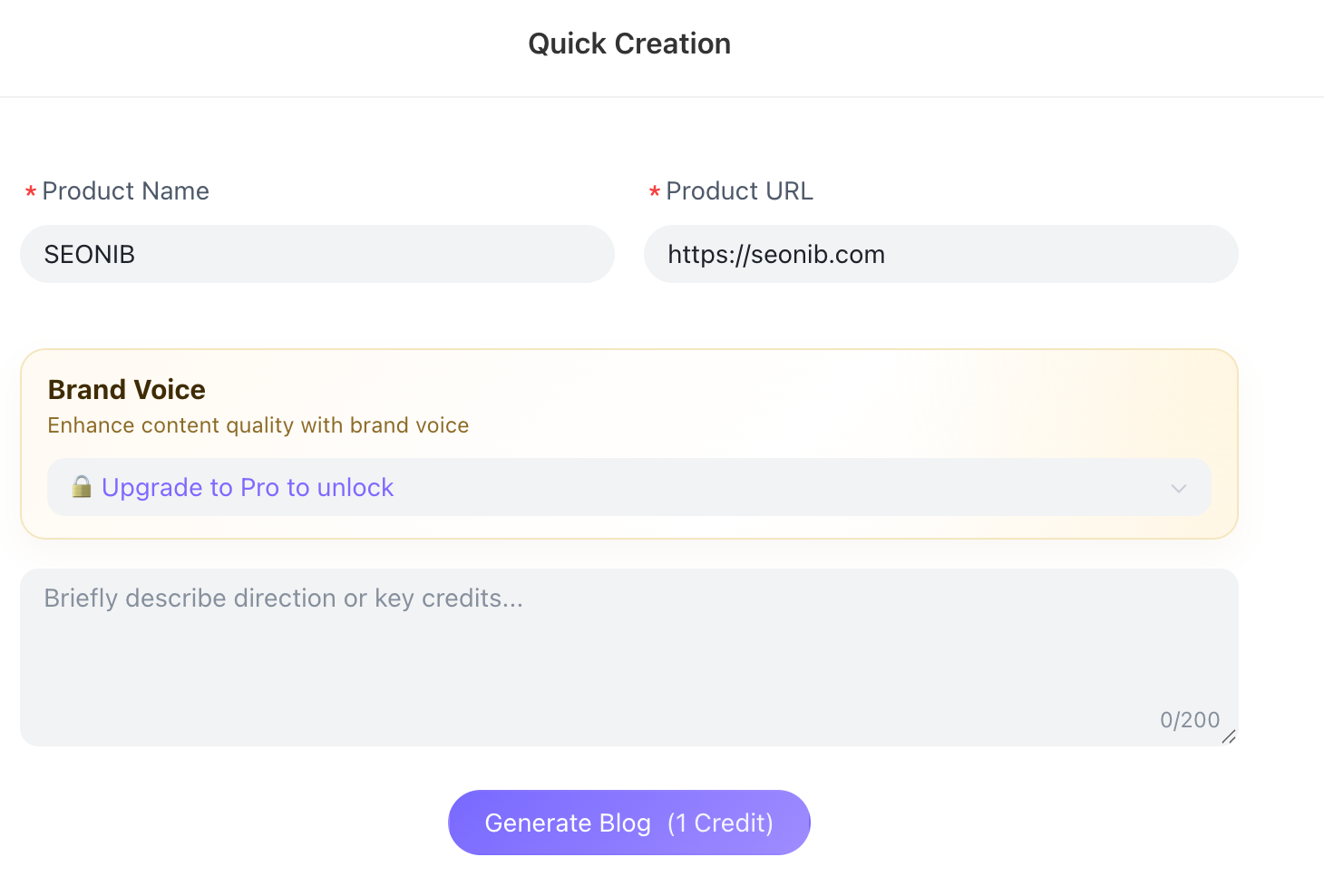
With Express Creation, all you need to do is enter a product link and a brief content direction, and SEONIB will automatically generate high-quality SEO blog content in just a few minutes.
Ideal for scenarios requiring rapid content production, quick publishing, and fast testing of traffic strategies.
I. Feature Overview
Express Creation is the fastest blog generation method offered by SEONIB.
Compared to other creation modes, it requires no complex setup—simply enter key information to quickly generate content.
Supports rapid generation of:
• Product marketing blogs
• SEO traffic blogs
• Scenario-based content
• Event promotion articles
• Problem-solving blogs
Ideal for:
• New product launches
• Best-seller testing
• Holiday marketing
• Temporary event promotions
• Daily blog content replenishment
II. Usage Steps
1. Access “Express Creation”
Click “Express Creation” in the left-hand menu to enter the quick creation page

2. Enter Product Information
(1) Product Name (Required)
If you already have a specific product to promote, we recommend entering the product name.
(2) Product Link (Required)
Enter the product link, for example:
https://yourstore.com
The system will automatically extract product information, including:
• Title
• Selling Points
• Feature Description
• Usage Scenarios
• Product Specifications
This helps improve the quality of the generated blog.
3. Set Brand Voice (Pro)
If you have upgraded to Pro, you can select a brand voice. This unifies the style of your blog content, such as:
• Professional Brand Style
• High-Conversion Marketing Tone
• Social Media Influencer Style
• High-End Brand Tone
This helps ensure the content aligns with your brand’s voice.
4. Enter Content Direction (Recommended)
We recommend specifying the key focus of your blog post.
For example:
Highlight product features and solutions to user pain points
Create a buying guide centered on summer use cases
Analyze industry trends and recommend products
The more specific you are here, the more accurate the generated content will be.
5. Click “Generate Blog”
Click “Generate Blog” (1 point) at the bottom of the page, and the system will automatically begin generating content.
III. What Sections Does the Generated Content Include?
The system typically automatically generates the following structure:
• SEO Title
• Meta Description
• Introductory Paragraph
• Automatic Internal Links
• Product Selling Point Analysis
• Usage Scenario Introduction
• User Problem Solutions
• FAQ Module
• Call to Action
This content is ready for direct publication on your blog.